

Frame vs WordPress
Standard WordPress is open-ended by design; anyone can install it, customize it freely, and modify it with coding. That flexibility is powerful, but it also means every WordPress site can be set up very differently and may be susceptible to security risks. Frame takes a different approach.
Because Frame serves thousands of Adventist churches, schools, and ministries across North America, Adventist Connect manages site hosting, security, updates, and performance for you behind the scenes. It also means certain intentional limits and additions have been made to keep every Frame site effective, secure, and supportable.
The result is Frame: a curated version of WordPress that's been shaped specifically for ministry use — simpler in some areas, and extended with ministry-focused tools in others.
What Looks the Same
If you've navigated a WordPress dashboard before, Frame's dashboard will feel recognizable. You'll find familiar menu items on the left-hand side, including Pages, Posts, Media, Comments, Users, Tools, and Settings. The page editor works the same way — adding and arranging blocks, working with text and images, embedding content, and organizing your page layout all follow the same patterns as you're used to in WordPress.
What Looks Different
A few areas of the dashboard will look noticeably different from what you might remember in a standard WordPress installation.
Additional menu items. Frame's dashboard includes several items you won't find in standard WordPress. Events, Podcasting, Forms, Galleries, Directory, Domains, and Stream are all part of Frame. These features are created to meet standard needs for Adventist institutions and you can learn how to manage these features in the Frame knowledge base.
No Plugins menu. Plugins on Frame are pre-selected, installed, and maintained by the Adventist Connect team. You can see which plugins are available in the Supported Plugins article.
Limited Appearance options. Frame themes are curated specifically for Adventist organizations, and style options within the editor reflect those themes rather than offering unlimited customization. You're welcome to switch between the available themes at any time without losing your content, but uploading custom themes or editing theme files directly isn't available.
Block and page editor differences. While the page editor works the same way overall, Frame includes custom blocks built to make your ministry content shine, and some layout limitations to keep your site feeling consistent and on-brand with ease.
Extended Settings. Frame's Settings menu includes several options not found in standard WordPress that control how key information appears across your site.
Where to Look for Help
Because Frame is customized, general WordPress tutorials and search results may not match what you see in your dashboard and can be misleading or confusing when your Frame experience looks different.
Start with Frame's Support Resources
The Frame knowledge base at support.adventistconnect.org is written specifically for our platform and reflects how Frame actually works. Here are a few ways to look things up right from your Frame account:
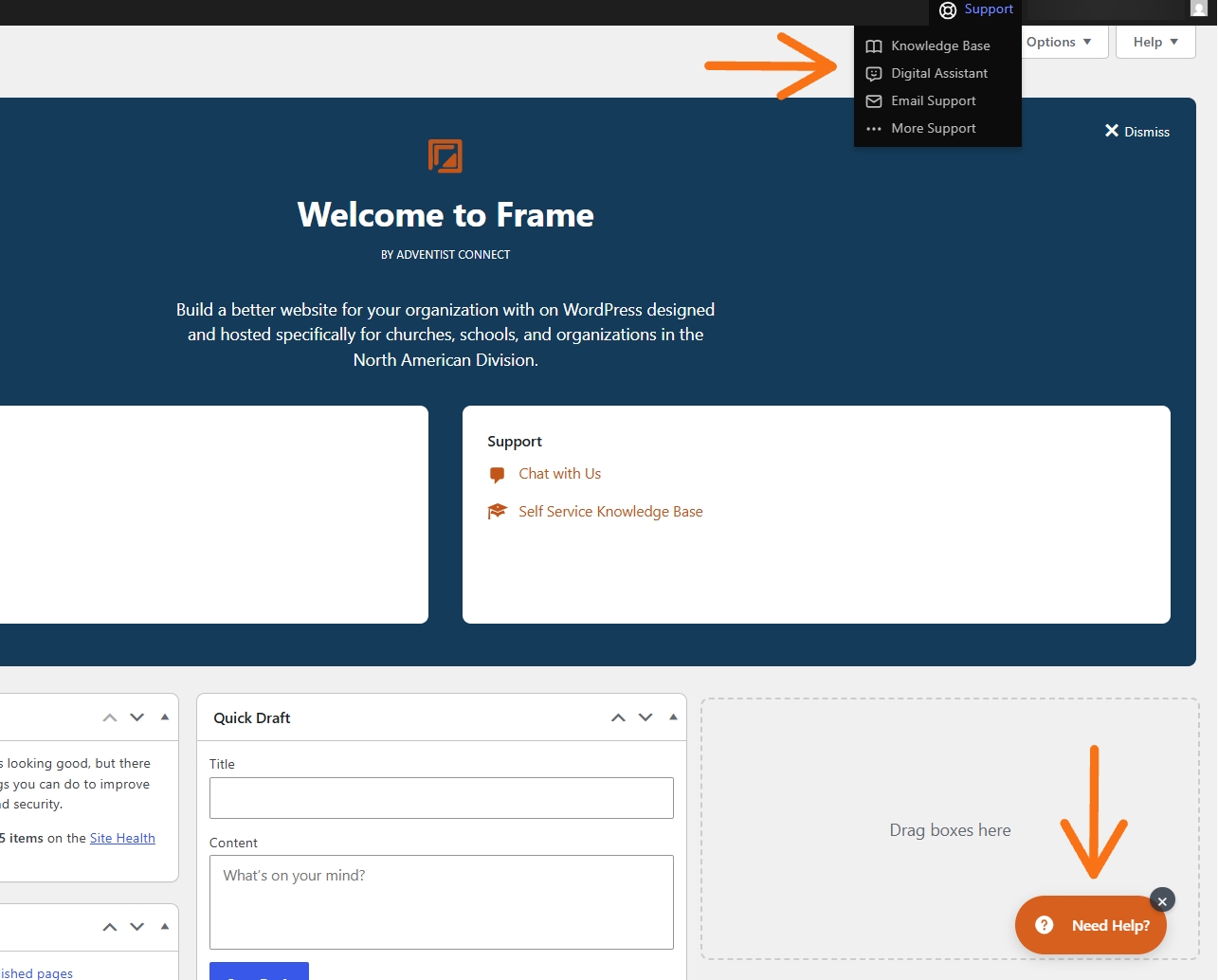
Navigate to your Dashboard > Home.
Hoover over the "Support" menu option, located in the top menu bar on the right hand side of your screen. We recommend either the Knowledge Base or Digital Assistant first before reaching out by email.
You can also click the orange "Need Help" button in lower right corner to access the Digital Assistant.
Frame Beginner Learning Resources
Here are some excellent Frame resources you might find helpful to get you started:
Getting Started with the Frame Dashboard
Creating Posts and Pages with the Frame Block Editor
Getting Started with Events Calendar
When WordPress Resources are Helpful
Because the block editor works similarly to standard WordPress, general WordPress tutorials on block editing, working with images, and understanding pages versus posts are usually applicable and can be a helpful supplement to Frame's documentation.
Nesting and using blocks to create visually appealing content
When in Doubt, Ask!
Frame's support team is here for you. If you can't find what you're looking for in the knowledge base or through the assistant, reach out directly at support@adventistconnect.org. You're not navigating this alone — and getting the right answer for your specific platform is always worth the ask.
If you have questions or need a hand with something on your website, we'd love to hear from you. Reach out to our support team at support@adventistconnect.org for personalized assistance.
Want to see what your website could look like? Check out our demo site to see what you can do on Frame!