

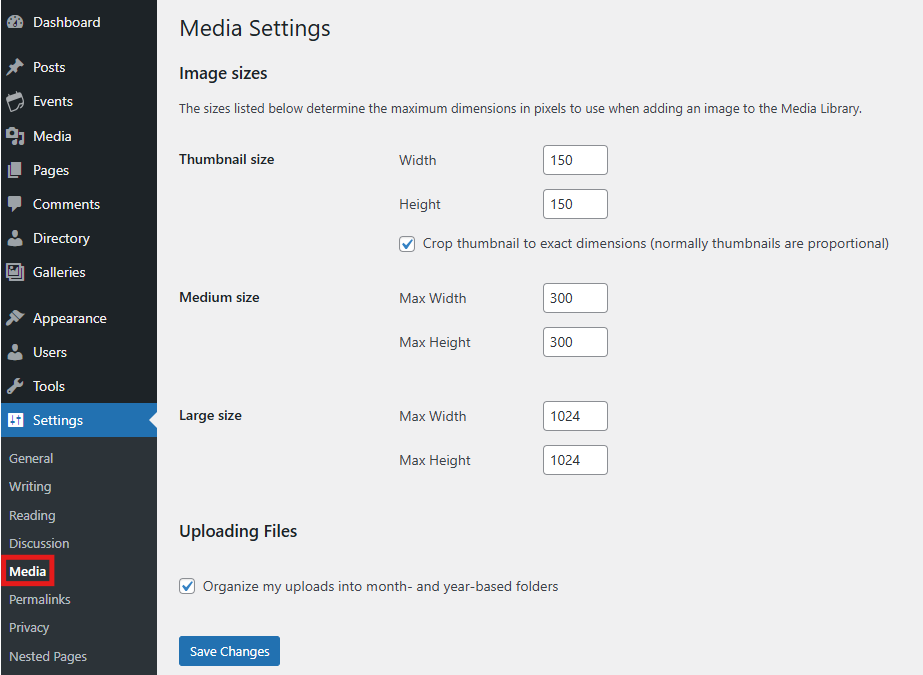
Image Sizes
These settings determine the maximum dimensions (in pixels) for images inserted into your content:
Thumbnail Size – Enter the width and height
Crop thumbnail to exact dimensions – Check this box if you want thumbnails cropped to the exact size instead of maintaining proportions.
Medium Size – Enter the max width and max height
Large Size – Enter the max width and max height
Uploading Files
Control how your uploaded media files are stored:
Organize my uploads into month- and year-based folders – Check this box to automatically sort uploads by date (for example, June 2023 uploads would be stored in uploads/2023/06). Frame will create folders for you automatically when needed.
After adjusting your settings, click the Save Changes button to store your preferences.