

If your calendar is displaying an old month (like June when it should show the current month of July), this is typically caused by one of two issues.
1. Misconfigured Block Settings
The calendar block may have a display date set in its settings that's preventing it from showing the current month. To fix this:
Find the page with your calendar and click to edit
Select the Calendar Embed block
Open the Block Settings panel on the right
Look for the "Date" field in the Display Options
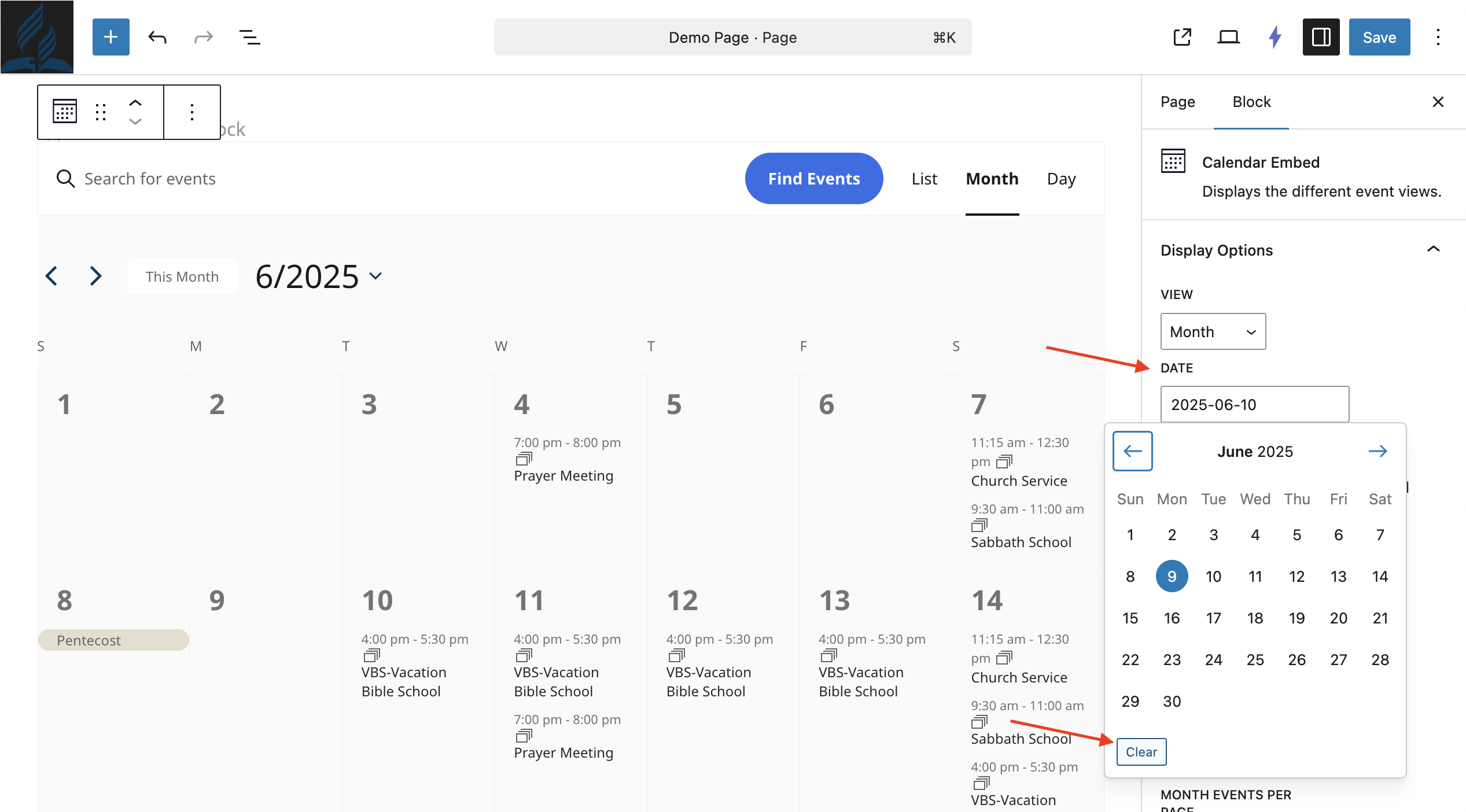
Clear this setting if a date is entered
Save your page
Once cleared, the calendar display will automatically update based on the current date.
2. Cache Issue
If you've recently logged in to your site to make changes, your browser may be showing a cached (old) version of the page. To fix this:
1. Clear Browser Cache
Your browser may be showing you an old version of the page.
To fix this:
Go to your browser settings (Chrome, Edge, etc.).
Find “Clear browsing data” or “Clear cache and cookies.”
Select your website and clear the data.
Then go back and reload your site.
2. Hard Refresh Your Browser
You can also do a quick “hard refresh” to force your browser to load the latest version:
Windows/Linux: Press Ctrl + F5
Mac: Press Command + Shift + R